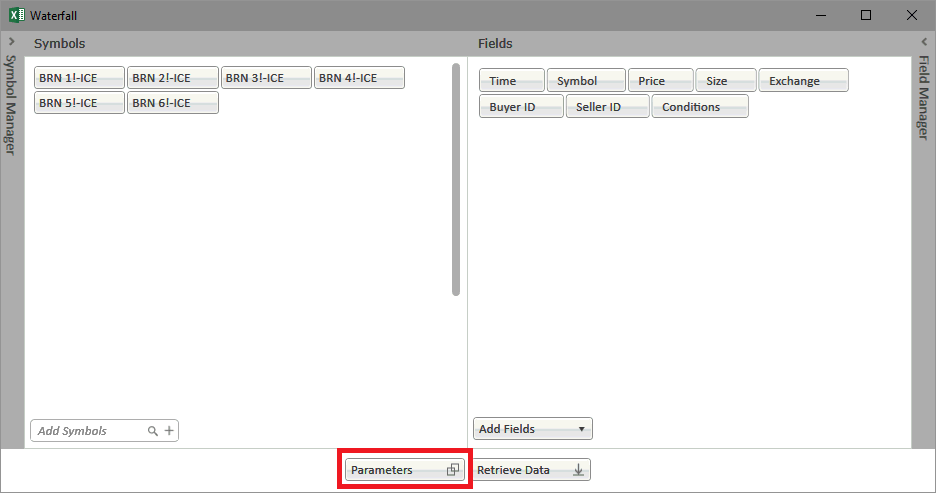
There are different parameters to help customize your waterfall output. You can get to this dialog by clicking Parameters button on the main Waterfall window.
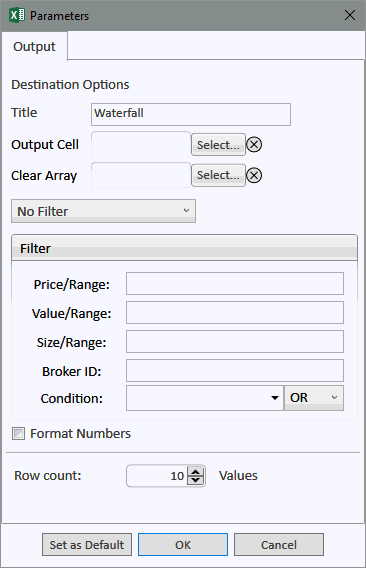
Waterfall Parameters
Destination Options |
|
| Title | The label to display in the cell which contains the Waterfall function |
| Output | Select a destination cell for the Waterfall output |
| Clear Array | Clear a defined array prior to any refresh |
Filters |
|
| Quick Filter | Filter for Trades, Block Trades, and other generic filters |
| Price/Range | Filter by price or price range |
| Value/Range | Filter by value of trade (price x lots) or value range |
| Size/Range | Filter by size of trade or size range |
| Broker ID | Filter by set of broker IDs. This is comma delimited |
| Condition Code | Filter by Condition code. This allows for AND or OR operators |
Other Elements |
|
| Format Numbers | Format the numbers using Excel formatting |
| Row Count | Set the number of rows for the output |
| Set as Default | Set current filter and field configuration as default |
OK |
Apply the parameters to the output function |
| Cancel | Cancel the creation of a Waterfall function |