
From the ICE XL Ribbon, click the Time and Sales button
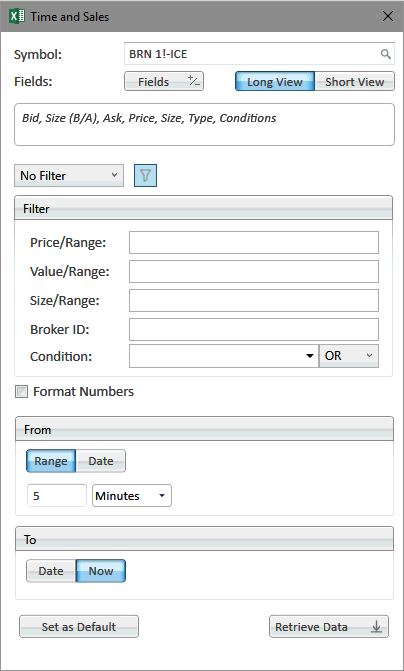
Symbols |
|
Symbol Entry |
Symbol selected for the Time and Sales output |
Symbol Search |
Use magnifying glass icon to access Symbol Search |
Fields |
|
Fields |
Fields selected to be added to the output |
Long View/Short View |
Long View and Short View define the output style for messages. Long View aggregates level one data to one line, while Short View keeps all messages separate |
Filters |
|
| Quick Filter | Filter for Trades, Block Trades, and other generic filters |
| Price/Range | Filter by price or price range |
| Value/Range | Filter by value of trade (price x lots) or value range |
| Size/Range | Filter by size of trade or size range |
| Broker ID | Filter by set of broker IDs. This is comma delimited |
| Condition Code | Filter by Condition code. This allows for AND or OR operators |
Other Elements |
|
| Format Numbers | Format the numbers using Excel formatting |
| From | Set the From date or index |
| To | Set the To date or index |
| Set as Default | Set current filter and field configuration as default |
| Retrieve Data | Construct the output function and retrieve the data into Excel |